
Forum
How to use the forum
Accessing the forum
-
Access and use the forum and other members' areas of the website using any web browser such as Chrome, Safari, etc on a computer, tablet or smartphone. -
Use the Wix App to receive notifications via an App directly on your device: -
Download the app here and open it. -
Tap Me from the bottom menu. -
Tap Join with an Invite. -
Enter the invite code 1QQY0T and tap Next. -
Tap Join.
-
-
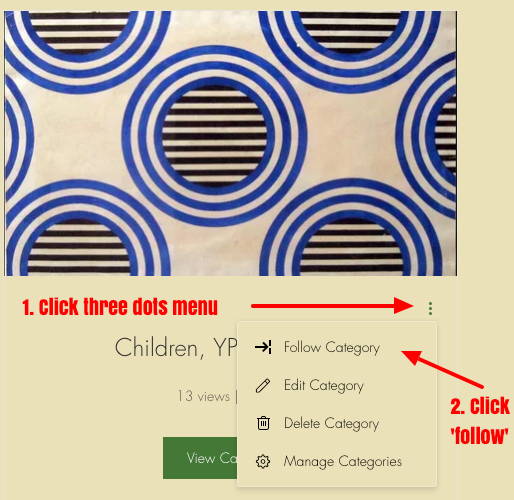
'Follow' and receive a notifications by email or the Wix App when new discussions are posted to a topic or group: -
Click the three dots menu on the right hand side of an individual post, discussion topic or group and choose "follow" to recieve those notifications:
-
-
Manage notifications you recieve from your My Member Settings page -
Tag a specific member to mention them in your post: type "@" plus a member's username to mention/notify that member in a forum post e.g @carlrogers - a dropdown will appear with a list of members after you type @ -
The tagged member will recieve a notification that they've been tagged. This works best if you complete your member account details in full with your full name.
-
-
When creating a new post email the google group [email protected] with brief details of the topic and the website URL of the discussion to encourage interested members to join the discussion.
-
Forum groups, such as regional groups offer a way to link up with other people with whom you share something - for example location, work environment, modality, interests, issues - and develop projects and campaigns together. -
The existing groups are just examples of what can be created, and we encourage you to form groups you want to be part of, as well as joining groups that mean something to you by clicking "follow" as shown above. -
To request a group to be created, email [email protected].
-
There are a few guidelines, both practical and ethical, which you are asked to follow: -
Treat other people's contribution in a respectful and constructive way, and avoid offensive and aggressive posts. -
Do not use this space to advertise - the events calendar is the place to post news of activities relevant to PCU’s remit -
To make the forum easy to use, start a new thread with a new name when the theme changes (you can make an announcement about this on the old thread). -
There will be some light moderation of discussions, and unacceptable posts will be removed. If you come across something you object to, please let us know via [email protected].
Recent posts
Get the Conversation Started
Be the first to post in this category.